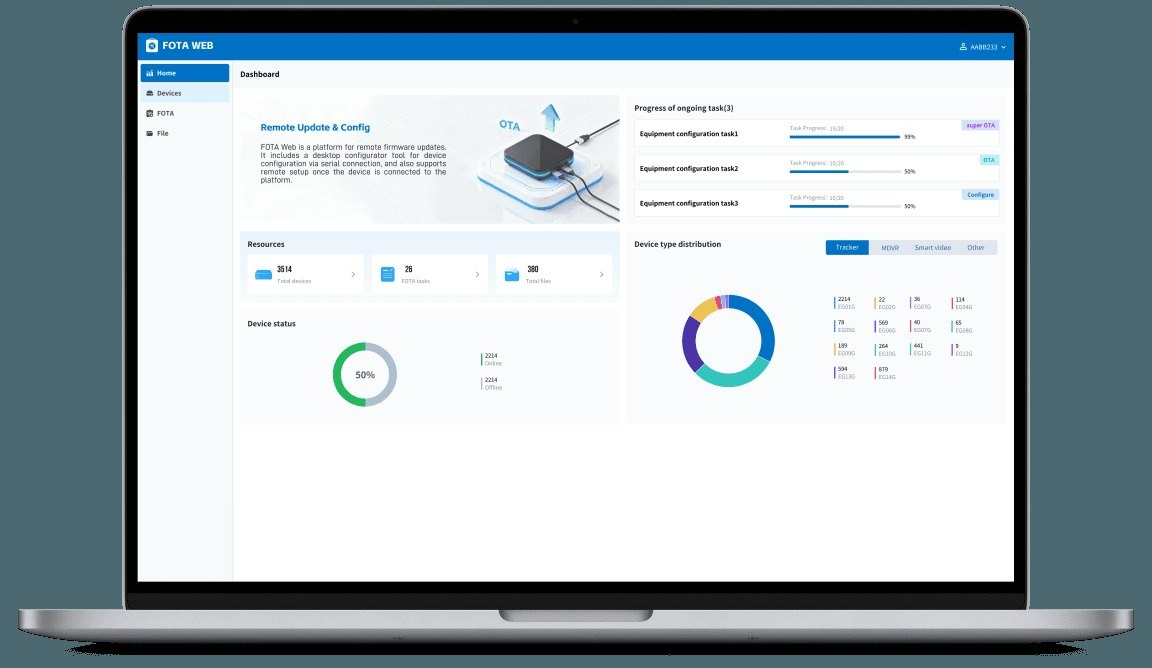
AI dashcams and MDVRs are rarely difficult to configure when only a few vehicles are involved. The challenge appears after hundreds or thousands of units have been installed across different cities, firmware versions, carriers, and vehicle types. At scale, remote device management gives fleet operators and solution providers a controlled way to maintain settings, software, device status, and troubleshooting information without sending every vehicle back to a workshop.
The management layer also needs to coexist with GPS fleet tracking software and video applications used for daily operations. Configuration tools, firmware services, and monitoring platforms should exchange clear device identities so an administrator can make a technical change without losing the relationship between hardware, vehicle, customer account, and operational history.
Create a Controlled Configuration Baseline
Large deployments need a known starting configuration. Camera parameters, AI thresholds, network settings, server addresses, recording rules, and reporting intervals can be organized by device model or fleet group. When that baseline is documented, administrators can identify exceptions instead of discovering months later that different depots have been using different settings for the same project.
Within the administration layer, remote device management should also use permission levels. A technical administrator may need firmware and network controls, while a fleet supervisor may only need device status or selected camera settings. Separating these roles reduces the chance of accidental changes and gives the organization a clearer audit trail when a configuration is modified.
For device commissioning, BSJ Technology provides a Configurator environment for device setup and AI settings, together with product resources. For integrators, a centralized setup workflow can shorten commissioning when devices are prepared in batches, but the project still needs naming conventions, template ownership, approval steps, and a record of which configuration is assigned to each customer or fleet group.
Configuration templates can also be staged by customer, region, or vehicle type instead of relying on one global profile. A heavy-truck MDVR may need different recording and AI rules from a two-channel dashcam in a delivery van. Grouping devices by approved baseline makes bulk changes safer because administrators can target the correct population and compare results before applying the same update elsewhere. Template owners can review these groups periodically so retired vehicles or transferred devices do not remain under the wrong policy.
Use FOTA and Health Data to Reduce Field Service
Firmware updates are one of the clearest reasons to manage devices remotely. A controlled FOTA process can distribute approved versions without requiring a technician to touch every vehicle. The update plan should include compatibility checks, staged rollout groups, network conditions, success reporting, and a rollback method in case a new version produces unexpected behavior.
Device health is equally useful when it points to action. Storage faults, camera loss, communication outages, abnormal restarts, or outdated versions can be prioritized before they create a long gap in operational evidence. Rather than treating every offline device as the same incident, support teams can use status data to distinguish network problems from hardware, power, or configuration issues.
The BSJ FOTA Web Platform is presented as a tool for remote firmware, settings, and deployment management. The broader BSJ fleet management environment also includes monitoring functions for vehicle tracking, video access, and fleet data. That separation of technical maintenance and operational visibility can help fleet teams define responsibilities between fleet users, technical support, and platform administrators.
Failed updates need an explicit recovery path. A device may lose connectivity during download, restart unexpectedly, or reject a package because of version dependencies. The management process should show failure status clearly, prevent repeated uncontrolled attempts, and give support teams a method to retry or roll back. Those safeguards are important when vehicles are dispersed across regions and cannot be reached quickly by technicians.
Integrate Technical Management with Fleet Operations
A technical platform cannot operate in isolation from the software that dispatchers use. In some integrations, GPS fleet tracking software may depend on specific reporting intervals, event codes, and device protocols, so a remote configuration change can affect dashboards and alerts downstream. Change management should therefore include an impact check on the customer-facing application before settings are pushed to a large group.
For third-party ecosystems, BSJ Technology supports integration with platforms such as Wialon and GPSGate together with flexible OEM/ODM cooperation. For distributors maintaining their own software stack, those capabilities can be useful, but interoperability needs to be tested with the real firmware version, event set, and device model used in the project. Documentation should be updated whenever the interface changes.
A mature remote-management program reduces unnecessary workshop visits without removing operational control. Standard baselines, staged updates, health monitoring, clear permissions, and platform-impact checks create a traceable lifecycle for every connected camera and recorder. When support teams can see both the technical state and the fleet context, they can resolve faults faster and keep large deployments more consistent over time.
Operational logs can connect technical changes with later fleet behavior. If an alert rate changes sharply after a configuration update, administrators should be able to identify when the setting was modified and which devices received it. Linking configuration history to vehicle groups makes troubleshooting faster and gives fleet customers a clearer record of changes that may affect dashboards, reports, or safety workflows. Audit records also help technical teams explain customer-visible changes without relying on individual staff memory.
